
Running a restaurant means moving guests smoothly from order to payment without friction, confusion, or delay. That last step matters more than many operators realize. A slow checkout, a failed card authorization, a disconnected handheld device, or a delayed deposit can affect guest satisfaction, shift flow, tip handling, and next-day cash planning all at once.
That is why a merchant account for restaurants is not just a back-office payment tool. It is part of the operating system of the business.
Whether you manage a café with a steady morning rush, a quick-service counter, a full-service dining room, a bar with open tabs, or a takeout-heavy concept with online ordering, the merchant account behind your payment flow influences how money moves through the restaurant every day.
Many restaurant owners hear terms like processor, gateway, POS integration, interchange, batching, funding, and chargebacks without getting a clear picture of how those pieces actually fit together.
That can make it hard to compare providers, spot hidden costs, or choose a setup that works for real restaurant operations rather than just sounding good in a sales pitch.
This guide explains what a merchant account for restaurants is, how it works in daily service, how restaurant merchant services support dine-in and off-premise payment flows, what fees and features matter most, and how to choose a setup that fits your operation.
The goal is practical understanding, so you can make better decisions, avoid common mistakes, and build a payment environment that supports both the guest experience and the business.
What a Merchant Account for Restaurants Actually Is
A merchant account for restaurants is a specialized type of account used to accept card and digital payments. It is not the same as your business checking account. Instead, it acts as a temporary holding and routing layer between the guest’s card payment and the final deposit into your bank account.
When a guest taps, inserts, swipes, or enters a card online, the funds do not go straight into your operating bank account. The transaction first moves through a payments chain that includes the POS or terminal, the payment processor, the card networks, the issuing bank, and the merchant account environment that receives and settles the approved transaction before funding reaches your business bank.
For restaurants, this matters because payment volume is constant, timing is tight, and workflows are more complex than in many other businesses.
Restaurants deal with tips, bar tabs, split checks, table transfers, online orders, refunds, voids, partial approvals, and recurring guest payment patterns. A general-purpose payment tool may accept a card, but a restaurant payment processing account needs to handle the real operational details of service.
In practical terms, a restaurant merchant account helps make these functions possible:
- Accepting chip, swipe, tap, and digital wallet payments
- Supporting integrated restaurant POS workflows
- Managing authorizations and delayed captures for tabs and tip adjustments
- Routing transactions for settlement
- Delivering funded deposits to your business bank account
- Supporting chargeback and dispute processes
- Working with gateways for online ordering and card-not-present payments
The merchant account is often bundled into broader restaurant merchant services, which may include payment processing, terminal support, gateway access, reporting, PCI-related support, and integration tools for your POS and online ordering environment.
Why restaurants need a purpose-built setup
A retail store may process a straightforward card payment in one step. A restaurant often does not. In full-service dining, the card may be authorized first, adjusted later for tip, and settled in a batch after the shift. In a bar, a guest may open a tab and add items over time.
In takeout or delivery, the payment may begin online through a gateway and then flow into the same reporting environment as in-store orders.
That is why a restaurant payment processing account should be evaluated based on how it performs in restaurant conditions, not just on a headline rate. The right setup supports real service patterns. The wrong one creates staff workarounds, reporting mismatches, delayed deposits, and unnecessary guest frustration.
What the merchant account is not
A merchant account is important, but it is only one part of the payment stack. It does not replace the POS, and it is not the same thing as your payment gateway or processor. Operators often hear these terms used loosely, which leads to confusion when reviewing contracts or comparing providers.
A helpful way to think about it is this: the restaurant merchant account is part of the financial plumbing that allows approved transactions to move toward settlement and deposit. It works best when connected to the right payment processor, gateway, and POS system for your service model.
How the Payment Stack Works in a Restaurant
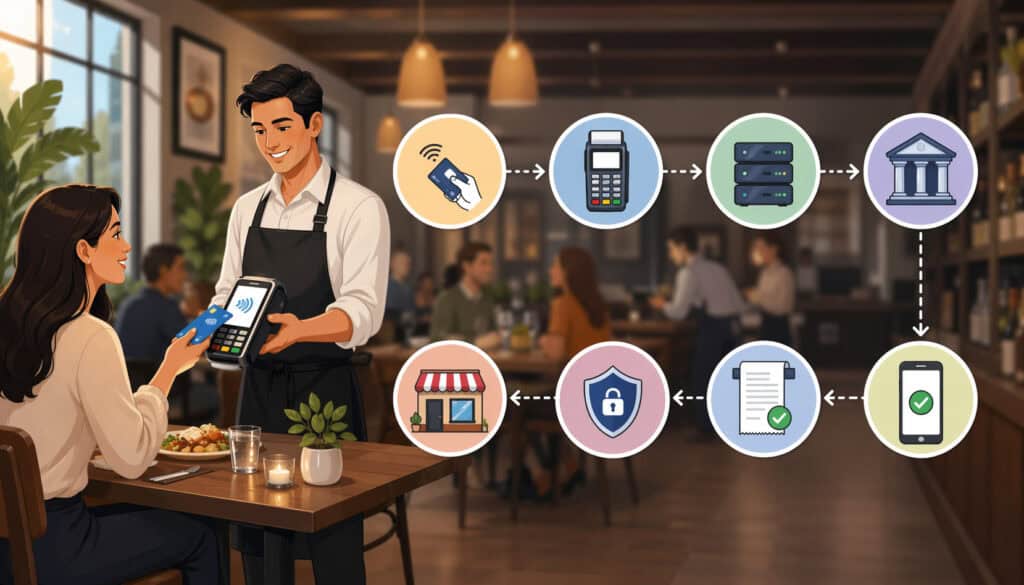
Restaurants often use several connected payment tools at once. Understanding what each one does makes it easier to compare providers, troubleshoot problems, and avoid buying overlapping services.
At a high level, your payment environment may include a POS system, card reader or terminal, processor, merchant account, gateway, and business bank account. Some providers bundle most of these together.
Others let you mix and match. Neither model is automatically better. What matters is whether the pieces work reliably together for your type of operation.
Here is a practical breakdown:
| Payment Component | What It Does | Why It Matters in Restaurants |
| POS system | Records orders, checks, menus, tables, staff actions, tips, and reports | Connects payment activity to service activity |
| Payment processor | Transmits transaction data between the restaurant, card networks, and banks | Handles approvals, communication, and transaction routing |
| Merchant account | Holds and manages funds flow between approved transactions and final funding | Supports settlement, risk controls, and deposit flow |
| Payment gateway | Sends online or card-not-present transaction data securely | Important for online ordering, stored cards, and recurring payments |
| Business bank account | Receives settled deposits from card sales | Where funded money lands after settlement |
| Card reader or terminal | Captures the payment method at the point of sale | Affects speed, reliability, and checkout experience |
This is where many restaurant owners get stuck: they may already have a POS, a processor, and a bank account, but they are not sure whether they also need a separate payment account for restaurant POS use, or whether their processor includes one.
In many cases, the merchant account is included as part of a bundled payments arrangement. In other cases, especially with more flexible or custom integrations, it may be part of a separate relationship.
Merchant account vs payment processor
The payment processor is the communication engine. It moves transaction data through the networks so the card can be approved or declined. The merchant account is the financial receiving environment that supports settlement and funding after approval.
Think of the processor as the messenger and the merchant account as the controlled receiving point for the funds flow. In restaurant operations, both matter. A fast processor with poor funding rules or weak chargeback support can still create problems. A well-structured merchant account with poor POS integration can do the same.
Merchant account vs payment gateway
A payment gateway matters most when the card is entered online, stored for future use, or used in a digital checkout flow. That makes gateways especially relevant for restaurant websites, mobile ordering, subscriptions, catering invoices, saved cards, and some kiosk environments.
A restaurant payment gateway account is not the same as the merchant account, though they often work together. The gateway securely passes transaction data from the online ordering environment to the processor and merchant account setup.
If your restaurant handles a large share of digital orders, gateway reliability becomes operationally important, not just technical.
Merchant account vs POS system
The POS is where the restaurant runs service. It manages tickets, tables, courses, modifiers, seat positions, tips, shift closeout, and sales reporting. The POS does not replace the merchant account. Instead, it should connect to the restaurant payment processing system so payment information flows back into the order record accurately.
If that connection is weak, restaurants end up dealing with mismatched sales and deposit records, extra manual reconciliation, duplicate transactions, or clumsy refund workflows.
For operators comparing systems, it helps to read educational guides on how a restaurant POS system works and why restaurant POS systems with integrated payments can affect operations beyond checkout.
Why Restaurant Payment Needs Are Different From Other Businesses
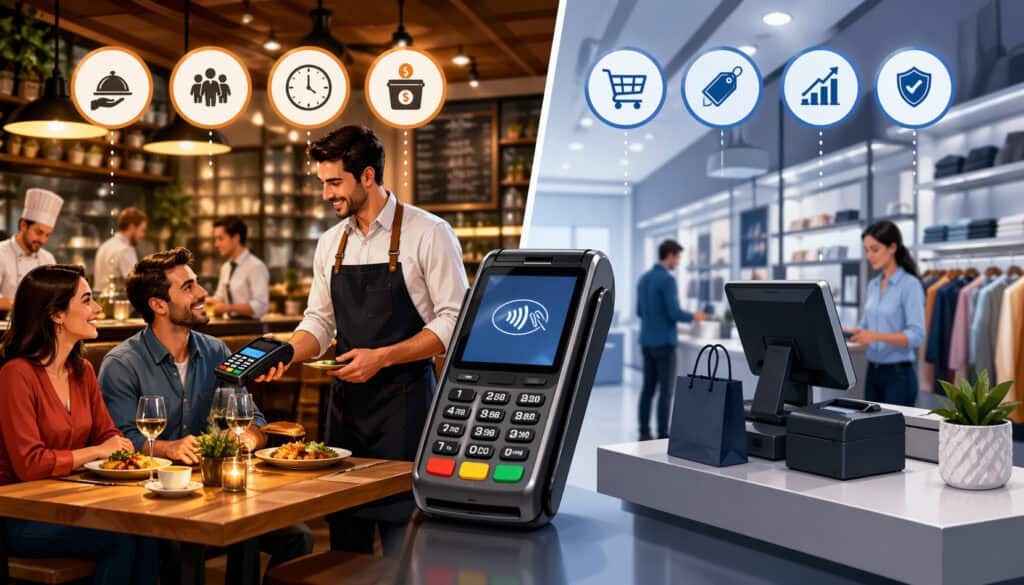
Restaurants process a high volume of relatively fast, operationally varied transactions. That alone makes their payment needs different from many other business types. But the real difference comes from how service happens.
Restaurants are not just accepting payments. They are tying those payments to guest flow, labor, menus, timing, and front-of-house execution.
A clothing boutique might complete one card sale and move on. A restaurant may split a table into four checks, authorize one bar tab, void a mistaken item, add a tip later, process an online order, and reconcile all of it before the shift ends.
That complexity is why merchant services for restaurants should be evaluated through an operational lens, not just a pricing one.
Different restaurant models also create different payment risks and requirements. A café needs speed at the counter and often relies on contactless acceptance. A full-service restaurant needs smooth tipping and checkout flows.
A bar needs open-tab support. A food truck needs reliable mobile connectivity and device flexibility. A takeout-heavy concept needs online ordering payment reliability and quick funding. A multi-location operator may care most about reporting consistency and centralized control.
Common restaurant-specific payment workflows
Some of the most important restaurant payment needs include:
- High transaction volume during rush periods
- Tipped transactions and post-authorization tip adjustment
- Split checks and split tender payments
- Bar tabs and delayed capture flows
- Online ordering and card-not-present acceptance
- Tableside payment with handheld devices
- Kiosk or self-service ordering
- Delivery and takeout payment integration
- Stored cards for repeat or house-account style workflows
- Real-time reporting tied to the POS
Each of these puts pressure on the restaurant credit card processing account to work smoothly with your service environment. Even small breakdowns create friction. A handheld reader that fails during dinner rush, a gateway that disconnects from online ordering, or a delayed funding schedule before payroll can have outsized effects.
How guest expectations raise the stakes
Guests now expect flexibility. They want to tap, insert, swipe, split, tip, save cards online, pay at the table, or order ahead without friction. Restaurants that cannot support those behaviors easily may lose time, trust, and repeat business.
This does not mean every restaurant needs every payment feature. It means the merchant account and payment setup should match the business model. A bakery counter may not need tableside pay, but it may need ultra-fast line throughput. A neighborhood bar may not care about kiosks, but it absolutely needs stable tab handling and quick tip reconciliation.
Real-world examples across restaurant types
A café with a morning rush needs fast tap-to-pay acceptance, quick receipt options, and simple reporting. Delays of even a few seconds per order can affect line movement.
A quick-service restaurant may process a huge number of smaller tickets, often with digital wallets, online ordering, and third-party pickup. Here, an efficient restaurant card acceptance solution can improve throughput and reduce reconciliation time.
A full-service dining room needs stronger support for tips, seat-level splits, handheld devices, and smoother closeout. The merchant account flow must work well with delayed capture and adjustment patterns.
A bar needs reliable preauthorization or tab functionality, strong permissions, and careful chargeback handling. Bar environments often see more disputes tied to tips, tabs, or guest confusion.
A food truck needs mobile-ready hardware, stable connectivity options, and simple funding visibility. Mobility matters more than elaborate back-office features.
A takeout-heavy restaurant depends heavily on its restaurant payment gateway account and online ordering flow. If gateway problems stop digital orders, revenue can drop immediately.
How a Restaurant Payment Processing Account Handles a Transaction
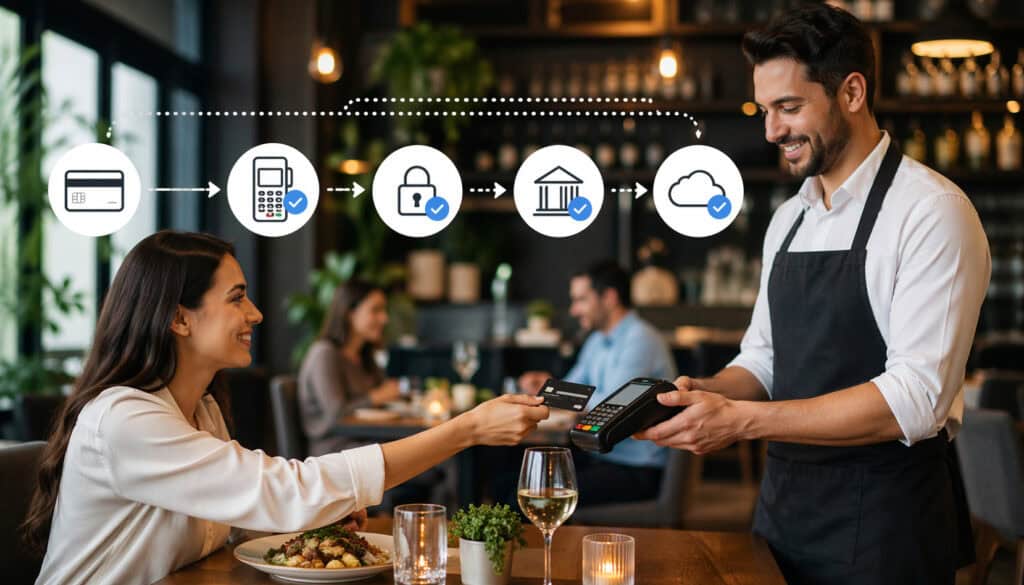
A transaction may feel instant to the guest, but several steps happen in the background before money reaches the restaurant. Understanding this helps operators make sense of payment delays, batch timing, deposit differences, and chargeback issues.
The life of a restaurant card payment typically includes authorization, capture, batching, settlement, and funding. In restaurants, there can also be tip adjustments, tab closures, and refunds layered into that process.
Authorization: the first approval step
Authorization happens when the restaurant requests approval for the transaction amount. The system checks whether the card is valid and whether funds or credit are available. If approved, the amount is essentially reserved.
In a quick-service environment, the authorization and final amount may match immediately. In full-service, the initial amount may be adjusted later to reflect the final tip. In a bar, the initial authorization may be a tab preauthorization that changes before closing.
This is why restaurants need a restaurant payment processing account designed for real service timing. The system should support restaurant-style payment flows rather than forcing awkward workarounds.
Capture and batching: where the details matter
Capture is the step where the approved transaction is finalized for settlement. In some setups, capture happens automatically. In others, transactions are collected into a batch that is closed at a certain time, often at end of day or shift close.
Batch timing affects when funds move. If the restaurant delays batch closing, funding may also be delayed. If staff forgets to close the batch correctly, the result may be operational confusion or a deposit that lands later than expected.
This matters in restaurants because daily cash planning often depends on predictable deposits. Food costs, labor, and vendor payments do not pause because settlement was handled poorly.
Settlement and funding: when money reaches the bank
After batching, the transactions move through settlement and then funding. The exact timeline depends on the provider, your risk profile, the transaction type, and the contract terms. Card-present transactions may fund faster than online or keyed entries. Weekends and cutoff times can also affect timing.
Here is a useful way to think about funding expectations:
| Transaction Scenario | Typical Process Complexity | Funding Predictability |
| Counter-service chip or tap payment | Lower | Often more predictable |
| Full-service transaction with tip adjustment | Moderate | Depends on closeout timing |
| Bar tab with delayed close | Moderate to higher | Depends on capture timing |
| Online ordering payment | Higher | Can vary by gateway and risk rules |
| Keyed transaction | Higher | May face more review or higher costs |
Operators often assume approval means the money is immediately theirs. In reality, the restaurant merchant account setup governs how approved payments move toward final deposit.
Chargebacks and disputes in practical terms
A chargeback happens when a cardholder disputes a transaction through their card issuer. The amount may be pulled back while the case is reviewed. Restaurants can see disputes related to duplicate charges, unclear billing descriptions, service complaints, fraud claims, no-show disputes, or online ordering confusion.
A good merchant account structure should make dispute handling more manageable. That may include better reporting, access to order details, device-level data, timestamps, and integrated documentation.
Restaurants that want to understand this more deeply can benefit from guides on the chargeback dispute process for restaurants and how to read a restaurant merchant statement line by line.
How Restaurant Merchant Services Support Daily Operations
Restaurant merchant services are not just about accepting cards. They support the workflows that shape daily service, labor coordination, guest satisfaction, and back-office accuracy. When those services are well matched to the operation, the payment process feels almost invisible. When they are not, problems surface everywhere.
The best merchant services for restaurants help unify on-premise and off-premise payments, tie transactions back to the POS, and reduce the manual steps staff and managers need to handle. That has practical value in every service model.
Dine-in, tips, and table service
In dine-in environments, payment tools need to support table-level accuracy. That includes seat-based check handling, split checks, split tender, tip prompts, manual tip adjustments where appropriate, and end-of-shift reporting tied to individual staff members.
If the restaurant credit card processing account does not work cleanly with the POS, servers and managers may spend extra time correcting tickets, closing checks manually, or tracing tip differences. That hurts closeout speed and creates avoidable stress at the worst time of day.
Handheld or tableside payment support can also matter. It shortens the “waiting to pay” moment, improves table turns, and helps guests feel the process is modern and efficient.
Takeout, delivery, and online ordering
Off-premise payments add another layer. Online ordering often introduces a gateway, stored tokenized payment data, and card-not-present transaction rules. Restaurants need the order, payment, taxes, tips, and fulfillment record to connect clearly.
That is why the restaurant payment gateway account and restaurant payment processing system should be evaluated alongside the in-store payment setup. A weak online payment flow can cause duplicate orders, failed transactions, guest complaints, and confusing reconciliation.
For operators reviewing setup steps, a guide on how to set up a restaurant POS system can help frame how payments, devices, and workflows should come together before launch.
Bars, tabs, and stored payment behavior
Bars often operate differently from dining rooms. Tabs may stay open longer. Preauthorizations may be used to reduce risk. Staff may need quick access to tab status, tip adjustment workflows, and manager controls for voids or corrections.
Stored payment credentials, when handled properly through secure tokenization, can also matter in some hospitality workflows. The key is that raw card data should not be casually stored inside the restaurant’s own environment.
Reporting, reconciliation, and operational visibility
Restaurant operators need to answer practical questions every day:
- Do POS sales match payment totals?
- Which deposits correspond to which batches?
- Are tips and refunds mapped correctly?
- Did the online ordering totals reconcile with the in-store reports?
- Are there unusual dispute or fee patterns?
A good payment account for restaurant POS use should help answer those questions quickly. Payment reporting should not live in a silo that forces the restaurant to cross-check multiple dashboards just to understand what happened during a shift.
The Features Restaurants Should Look For Most
Choosing a merchant account for restaurants is less about chasing the longest feature list and more about identifying what directly supports your operation. The right features can improve speed, cash flow visibility, reporting, and guest experience. The wrong priorities can leave you with unnecessary complexity or hidden costs.
Every restaurant is different, but some features deserve serious attention across nearly all concepts.
POS compatibility and payment integration
POS compatibility should be one of the first screening questions. If the merchant account and processor do not work smoothly with your POS, almost every other benefit becomes harder to realize.
Good compatibility should support:
- Payment status flowing back into the POS automatically
- Order-level and check-level transaction mapping
- Refunds and voids handled with minimal manual work
- Device support for the service model
- Reliable reporting between sales and payments
Restaurants should also ask whether all features work equally across all supported processors or whether certain functions only work with a preferred setup.
Tipping, handhelds, and front-of-house execution
Restaurants with table service, bars, or hospitality-heavy operations should look closely at tipping support. The system should handle prompts, adjustments, reporting, and manager permissions in a way that fits the operation.
Handheld or tableside payment support also matters for many concepts. It can help with faster turns, better guest convenience, and cleaner service flow. But not every handheld setup is equal. Operators should test battery life, connectivity, receipt flow, and how quickly the device syncs with the main POS.
Fast funding and deposit transparency
Fast funding may be useful, but clarity matters even more than marketing language. Ask exactly when batches close, how weekends affect funding, whether transaction types settle differently, and what causes delays.
A strong restaurant payment processing account should offer:
- Clear batch cutoff times
- Deposit visibility by batch or date
- Easy reconciliation with bank deposits
- Transparent explanation of exceptions and reserves, if any
Online ordering and omnichannel support
Restaurants with takeout, delivery, or catering volume should evaluate online payment support carefully. This includes gateway reliability, tokenization for stored cards, reporting alignment, and how online orders appear inside the POS.
Do not assume “online ordering integration” means the whole payment flow is smooth. Ask how refunds work, where failed authorizations appear, and whether reporting combines channels clearly.
Security, PCI-related support, and dispute handling
Restaurants do not need to become security experts, but they should expect a provider to support secure card acceptance and help reduce operational exposure. Good support may include guidance on PCI-related tasks, secure devices, permissions, tokenization, and better dispute management tools.
How Restaurant Merchant Account Setup Works Step by Step
A strong restaurant merchant account setup should feel methodical, not rushed. Restaurants that move too quickly often discover compatibility problems, staff confusion, device issues, or online ordering gaps after go-live. A careful setup process reduces disruption and helps the system work as intended from the start.
Step 1: Application and basic underwriting
Most setups begin with an application and underwriting review. The provider may request business formation documents, ownership details, tax information, banking information, estimated card volume, average ticket size, and business model details.
Restaurants should be accurate here. Understating volume or leaving out important sales channels can lead to problems later. A dine-in restaurant that also does large catering invoices or heavy online volume should disclose that clearly.
Underwriting is not just paperwork. It is part of how the payment provider assesses risk and configures the account. That can affect funding timing, approval limits, and documentation requirements.
Step 2: POS and software planning
Before devices are deployed, the restaurant should confirm how the merchant account will connect to the POS, online ordering tools, handhelds, kiosks, and any back-office reporting software.
This stage should answer questions such as:
- Which devices work with the chosen POS?
- Is there a separate gateway for online ordering?
- How are refunds handled?
- How do tips flow into reporting?
- How are deposits displayed for reconciliation?
Step 3: Hardware setup and device configuration
The physical payment environment matters. Devices should be configured for the right service model and placed where staff can use them efficiently. A quick-service counter setup is very different from a full-service floor plan or a mobile truck environment.
Device planning may include countertop terminals, customer-facing readers, handheld devices, mobile readers, kitchen-adjacent pickup stations, or kiosk components. Connectivity should also be tested in real operating conditions.
Step 4: Testing real payment scenarios
Testing should go beyond a basic swipe or tap. Restaurants should simulate the real transactions they expect every day, including:
- Tipped dine-in checks
- Split payments
- Refunds and voids
- Online orders
- Tab opening and closing
- Handheld transactions
- End-of-day batch closing
A setup is not truly ready until these common scenarios work consistently and reporting matches expectations.
Step 5: Staff training and shift-level readiness
Staff training is often underestimated. Front-of-house staff should know how to take payments, split checks, handle declined cards, process refunds correctly, and explain payment prompts to guests. Managers should know how to close batches, review deposits, inspect disputes, and spot irregularities.
This is also the point where written payment procedures help. A short shift guide can reduce mistakes and improve consistency.
Step 6: Post-launch review and adjustment
The first week or two after launch should include extra review. Look at deposits, tips, voids, online order reporting, and guest-facing payment flow. Small adjustments made early can prevent long-running friction later.
For operators who want a broader implementation perspective, educational resources on how to set up a restaurant POS system and how to secure your restaurant payment system can help frame what should be checked before and after launch.
Common Costs and Fees in Restaurant Merchant Services
Cost matters, but restaurant owners should look beyond a single advertised rate. The real cost of restaurant merchant services usually includes several layers, and those layers can vary depending on transaction mix, software setup, online ordering needs, device type, and contract structure.
A payment quote that looks cheaper on the surface may cost more over time if the reporting is fragmented, the gateway is extra, chargeback support is weak, or the POS integration is incomplete.
Transaction fees and pricing structure
Most restaurants will pay a combination of percentage-based and per-transaction fees. These may be structured as flat-rate pricing, interchange-plus pricing, or another model. The important thing is to understand the total cost, not just the label.
Costs can be influenced by:
- Card-present versus card-not-present volume
- Rewards card mix
- Debit versus credit usage
- Online ordering share
- Keyed entry volume
- Average ticket size
A takeout-heavy concept with heavy online ordering may have a different effective cost profile than a café with mostly in-person tap payments.
Monthly and service-related charges
Many restaurants also see monthly charges beyond transaction fees. These may include:
- Monthly account fees
- Gateway fees
- PCI-related fees
- Statement or reporting fees
- Device support fees
- Chargeback fees
- Software or integration fees
- Equipment warranty or replacement costs
Not every provider charges all of these, but restaurants should ask for them explicitly in writing. The question is not only “What is the rate?” but “What does the full monthly payment environment cost?”
Software and operational cost overlap
Sometimes what looks like a payment cost is partly a software cost. For example, online ordering, advanced reporting, or device management may sit partly in the POS plan and partly in the payments plan. Restaurants should understand where those boundaries are.
That is one reason it helps to understand what a merchant fee at a restaurant really includes and how to compare it against the restaurant’s actual order mix.
Why the cheapest-looking option can cost more
A low headline rate can be offset by slow funding, poor reporting, clunky refunds, weak support, or more disputes. In restaurants, operational friction has a cost too. If managers spend extra hours reconciling deposits or handling avoidable payment errors, that should be part of the evaluation.
Mistakes Restaurant Owners Commonly Make
Restaurant operators are busy, and payment decisions are often made under pressure. A new opening, a POS switch, or a pricing conversation can cause owners to focus on the most visible number instead of the most important operational questions. That is understandable, but it often leads to avoidable mistakes.
Choosing based only on the headline rate
The most common mistake is selecting a provider based only on the advertised rate. That overlooks monthly fees, gateway costs, statement fees, device limitations, batch timing, and support quality. It also ignores how the restaurant actually takes payments.
A restaurant with a large share of online orders should not compare offers the same way a mostly in-person café would. The transaction mix matters.
Ignoring POS compatibility
Restaurants sometimes assume all processors work the same way with all POS systems. They do not. Even when an integration exists, not every feature may work equally well.
Refund handling, tip adjustment, reporting sync, or handheld support may differ by integration path. This is especially risky when switching either the POS or the processor without reviewing the full workflow first.
Overlooking online ordering payment flow
Restaurants may focus on in-store devices and forget that digital payments are a major part of revenue. If online ordering, delivery, catering invoices, or saved-card workflows matter, the gateway and reporting setup deserve equal attention.
A poor online payment flow can create guest complaints that front-of-house staff cannot solve easily.
Misunderstanding funding timelines
Some operators assume card sales from today will always deposit tomorrow. In reality, the funding timeline depends on batch timing, weekends, transaction types, contract terms, and account review rules. If the restaurant depends on predictable cash flow, this needs to be understood upfront.
Failing to review chargeback handling terms
Restaurants sometimes ignore dispute procedures until the first chargeback arrives. By then, it is too late to redesign the process. Chargeback support, documentation access, and response deadlines should all be discussed in advance.
How the Right Merchant Account Affects Guest Experience and Operations
A merchant account for restaurants may seem invisible to guests, but its effects are not. The right setup helps service feel smooth. The wrong one introduces delays, awkward moments, and extra staff effort. Because payment happens at the end of the guest journey, it often shapes the final impression of the visit.
Guest experience and checkout confidence
Fast, accurate payment acceptance supports trust. Guests notice when it takes too long to pay, when a card has to be rerun, when the check split goes wrong, or when the online order confirmation does not match what they expected. A stable restaurant card acceptance solution helps prevent those moments.
Tableside payment can improve convenience in full-service settings. Tap-to-pay can speed counter service. Clear digital receipts can reduce confusion. These may sound like small touches, but in busy restaurants they add up.
Cash flow and daily management
Reliable payment operations also affect management. Predictable funding helps with planning. Cleaner deposits help with bookkeeping. Fewer mismatches mean less time spent chasing numbers at the end of the day.
For independent operators and small groups, that matters because time is limited. A cleaner payment environment frees managers to focus on food, labor, and guest experience instead of payment cleanup.
Reporting and reconciliation
The right setup supports accurate reporting across dine-in, takeout, online ordering, and bar activity. It should be easier to answer where money came from, what was refunded, what is pending, and which deposits map to which sales periods.
That clarity also helps with menu analysis, labor planning, and exception review. When payments and sales data connect properly, the restaurant can make better operating decisions with less guesswork.
Practical Checklist for Choosing and Setting Up a Merchant Account for a Restaurant
Restaurants do not need the perfect setup on paper. They need the right setup for their real service model. This checklist can help narrow the evaluation and reduce surprises during implementation.
Selection checklist
Before choosing a provider, ask:
- Does the merchant account work cleanly with the current or planned POS?
- Does it support the restaurant’s mix of dine-in, takeout, delivery, online ordering, and bar service?
- How are tips handled?
- How are split checks and split tender payments handled?
- Is handheld or tableside payment supported if needed?
- What is the actual funding timeline?
- Are online ordering and gateway functions included or separate?
- What are all recurring and one-time fees?
- How are chargebacks handled?
- What reporting is available for batches, deposits, and disputes?
- What PCI-related support is provided?
- Are contract terms flexible and clearly documented?
Setup checklist
Before launch, confirm:
- Merchant application and underwriting are complete
- Bank deposit details are correct
- POS integration is confirmed
- Devices are installed and tested
- Online ordering payments are tested
- Tips, refunds, and voids are tested
- Batch close process is documented
- Managers know how to review deposits and disputes
- Staff knows how to process common payment scenarios
- Backup procedures exist for device or connectivity problems
Frequently Asked Questions
Do restaurants need a separate merchant account if they already have a POS?
Not always, but they do need access to the merchant account function within their payment setup. Some POS providers include a bundled merchant account and processor arrangement, while others allow a separate processing relationship. What matters most is whether the setup supports your restaurant’s payment flow, funding timeline, tipping needs, and reporting requirements.
What is the difference between a restaurant merchant account setup and a business bank account?
A business bank account is where your settled deposits are received. A restaurant merchant account is part of the payment system that helps manage approved card transactions before they are funded to your bank. It is designed for card acceptance, settlement, and transaction handling rather than general business banking.
Can a restaurant use the same payment setup for dine-in and online ordering?
Yes, many restaurants use one connected payment environment for both in-person and online transactions. However, dine-in payments and online payments often follow different paths because online orders usually depend on a payment gateway and card-not-present processing. The best setup is one that keeps reporting, reconciliation, and refunds clear across both channels.
How long does it take to set up a restaurant payment processing account?
The timeline depends on underwriting, business documentation, POS integration, hardware setup, and any online ordering requirements. A simple counter-service restaurant may be set up faster than a full-service concept with handheld devices, tipping workflows, and multiple order channels. Testing real payment scenarios before launch is an important part of the process.
What should restaurants prioritize first when comparing providers?
Restaurants should start with operational fit rather than price alone. Important priorities include POS compatibility, tipping support, funding transparency, online ordering integration, reporting quality, chargeback support, and the total cost structure. A payment setup that works smoothly in daily service is usually more valuable than one that only looks cheaper at first glance.
Are chargebacks a major concern for restaurants?
They can be, especially for online orders, duplicate charges, bar tabs, and disputes involving guest confusion or service issues. Restaurants should understand how chargebacks are handled, what evidence can be submitted, and how quickly responses are required. A strong payment setup can make dispute management more organized and less disruptive.
Is fast funding always worth paying extra for?
Not necessarily. Some restaurants benefit from getting funds faster, but many care more about consistency and visibility than raw speed. A predictable funding schedule, clear batch cutoffs, and easy deposit reconciliation can be more useful than a premium funding option that adds cost without solving day-to-day operational needs.
What documents are usually needed for restaurant merchant account setup?
Most providers ask for basic business and ownership information, tax identification details, bank account information, estimated processing volume, and formation documents. Some may request additional documentation depending on the restaurant’s business model, sales channels, and underwriting review.
Conclusion
A merchant account for restaurants does much more than move money from a guest’s card to the business bank account. It supports the pace of service, the guest checkout experience, tip handling, online ordering reliability, batch closeout, reporting clarity, dispute response, and day-to-day cash flow management.
That is why choosing the right setup should be treated as an operating decision, not just a payments decision. Restaurants need a solution that fits how they actually work: how they take orders, close checks, manage tips, handle tabs, process digital orders, and reconcile sales at the end of the day.
A low advertised rate does not mean much if the system creates friction during service or confusion in the back office.
The most effective approach is practical and methodical. Understand the role of the merchant account. Separate it from the processor, gateway, POS, and bank account. Map your busiest workflows.
Test the real transaction scenarios your staff handles every week. Review funding terms, fee structure, support quality, and reporting visibility before signing anything.
When a restaurant’s payment setup is built well, service feels smoother, staff spends less time correcting errors, managers get clearer numbers, and guests leave with a better final impression. That is the real value of choosing the right merchant account for restaurants.